WombatNET Help Centre
JavaScript is required for the interactive interface. All articles are listed below.
Speed & Performance
The short version: if you've got decent internet at home, turn on Wi-Fi calling on your phone. It's free, takes a minute, and solves coverage issues in most homes. If…
The short version: if you’ve got decent internet at home, turn on Wi-Fi calling on your phone. It’s free, takes a minute, and solves coverage issues in most homes. If that’s not an option, or you need signal for people who aren’t on your Wi-Fi, an approved booster is the next choice.
Note: The cheap boosters sold on overseas websites (such as www.cellphoneboosters.co.nz) aren’t legal to use here.
Why it’s got worse It’s not just you. 3G is gone, with all networks being switched off for good earlier this year. In most rural areas, phones now run exclusively on 4G, and 4G doesn’t always reach the same spots that 3G did, especially inside houses tucked behind a hill or a shelter belt. A Federated Farmers survey this month found that a third of farmers have a spot on the farm that worked on 3G but no longer does. So if you used to get calls through in the kitchen but can’t anymore, that’s probably why.
We don’t operate the cell towers, so we can’t fix the coverage itself. What we can do is help get calls working reliably inside your home.
One quick check first: text 3G to 550 . It tells you whether your phone is set up for 4G calling, including 111. Don’t ring 111 to test it.
Fix 1: Wi-Fi calling (free, try this first) Your phone sends calls and texts over your home internet instead of the mobile network. Same number, same phone, no install needed. When you leave Wi-Fi range, it switches back to the mobile network automatically (where coverage is available).
iPhone: Settings, then Phone, then Wi-Fi Calling. On some iOS versions, it’s under Mobile Data instead.
Android: Open the Phone app, tap the three dots, then Settings, and look for Wi-Fi calling. On some Samsung mobiles, it’s under Settings, then Connections.
If your phone asks for an emergency address, enter your real one.
A few things to know:
Most Spark, One NZ and 2degrees plans include it at no extra cost. If you’re on prepaid or with a smaller brand, double-check with them. It uses hardly any data. Spark puts it at 1 to 5MB’s per minute of talking. It only works where your Wi-Fi reaches. No Wi-Fi in the shed, no calls in the shed. It drops out in a power cut unless your modem and router are on a UPS. Some VPNs (including work ones) will block it. Spark says 111 calls go through over Wi-Fi calling when there’s no mobile signal. Check with your own provider before relying on this. Emergency Mobile Alerts are only sent over the mobile network, so you may miss them with no coverage. Follow your local civil defence page as a backup.
It works over WombatWireless X, WombatWireless 4G+, and WombatOptic, and over any other decent connection, including Starlink.
On 4G+? The modem, with an antenna mounted on the roof, can often reach a tower too far away for your phone to see from inside the home. Wi-Fi calling can then piggyback on that.
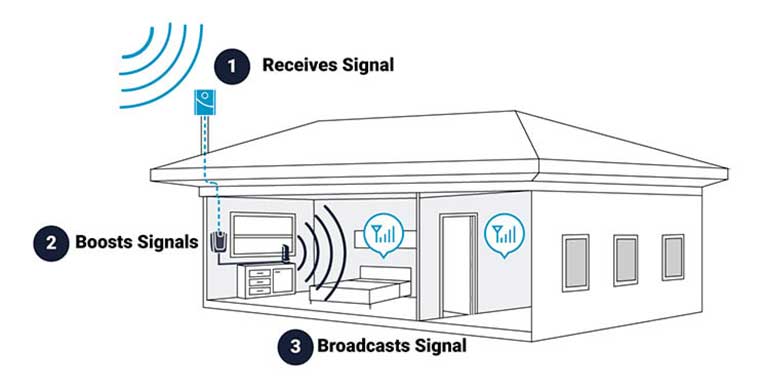
Fix 2: an approved booster A cellular booster system uses an antenna on your roof or gable to capture a weak signal and repeat it inside. Every phone on that network gets proper bars, including visitors and workers, with no settings to change. Your phone thinks it’s connected directly to the cell tower.
It needs some signal outside to work with. It can’t make signal out of nothing, so we test on site before recommending one. The regulator and carrier must pre-approve boosters. In New Zealand, only Nextivity Cel-Fi boosters have received regulator (RSM) approval, and we’re the installer for Wellington and the lower North Island. The cheap ones from overseas websites aren’t legal here and can cause network problems for your neighbours. Carriers often block them quickly, leaving you with an expensive paperweight. WombatNET manages the carrier pre-approval process for new installations. It only covers one network at a time. If users in your household are split across networks, you will need to install a separate booster for each carrier; otherwise, you may want to look at Wi-Fi calling as an alternative. It’s a fully installed solution, so it costs real money, whereas Wi-Fi calling costs nothing. We’ll give you a price once we’ve scoped your place. Old booster stopped working after 3G went? It may have been built for 3G. Send us the model, and we’ll tell you whether we can sort it.
A booster earns its keep when you don’t have reliable internet yet, when staff or visitors need signal without logging into your Wi-Fi, when non-mobile phone hardware needs mobile signal, or when Wi-Fi calling isn’t cutting it for whatever reason.
Don’t bother with Satellite texting as your main option at home. It’s a handy backup out on the farm, but it isn’t built to replace coverage at the house, and it does not work indoors.
Running the house off your phone’s hotspot. It drains and heats the phone, chews through data, and only works where the phone already has signal.
Which one do I need? Good internet at home: Wi-Fi calling.
No good internet yet: sort that first, then Wi-Fi calling does the rest. We’ll tell you whether fixed wireless, 4G+ or fibre suits your address, or whether Starlink is the better bet.
Signal outside but not inside, or people who need to call without pre-connecting to your Wi-Fi: a booster.
Dead spots out in the paddocks: neither fixes that. Report it to your mobile provider. One NZ has a handy tool called One Pin to help you do this.
Want a hand? Give us a ring on 0800 424 281 or email support@wombatnet.co.nz . Send your address and which network your phones are on. We’ll tell you what will work, and if we can’t get you the answer, we’ll put you in touch with someone who can.
Account & Billing
A quick walkthrough for adding your card and turning on autopay in the WombatNET billing portal, so your invoices get paid automatically each month.
Enabling Autopay means your WombatNET invoices are paid automatically each month, so you don’t have to keep an eye on due dates or get a reminder from us. It takes a couple of minutes to set up. Here is how it works.
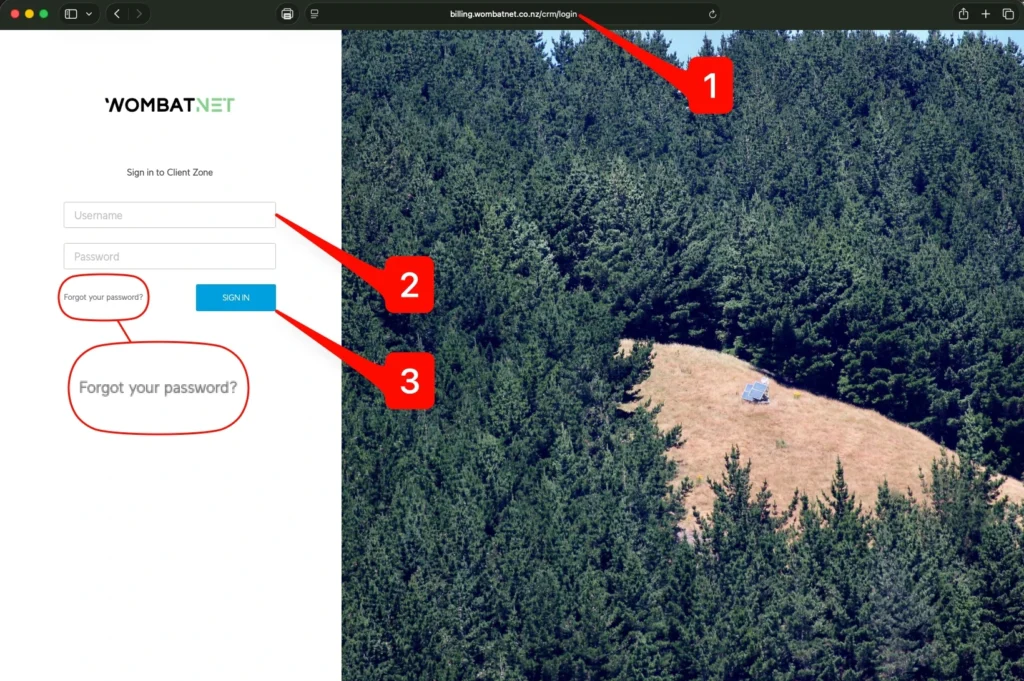
Step 1: Sign in to the Client Zone Head to billing.wombatnet.co.nz . Your username is your account email address. If you cannot remember your password or have not set one up yet, click “Forgot your password?” and we will send you a link to get sorted out. If you get stuck at any point, just contact us , and we will give you a hand.
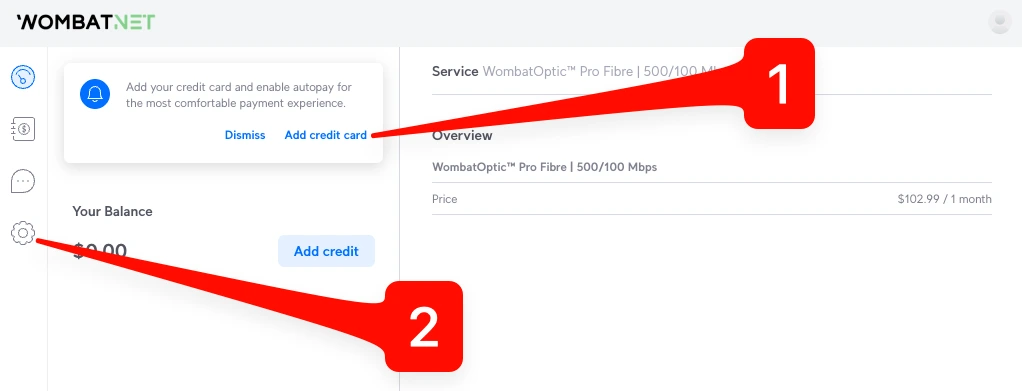
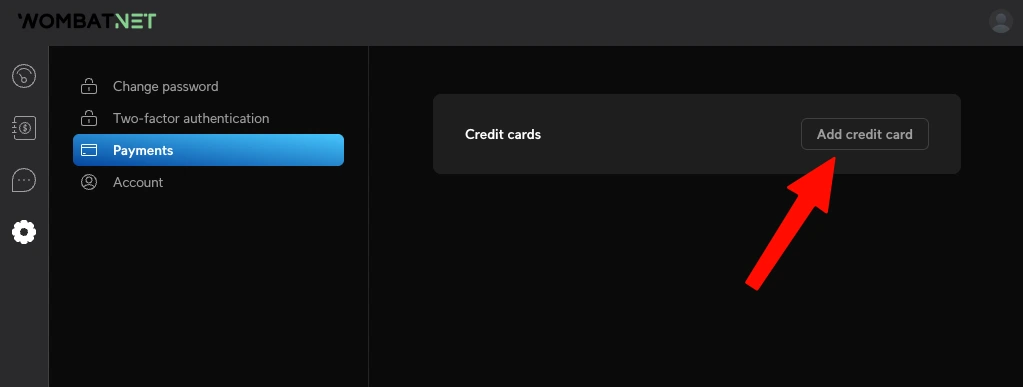
Step 2: Open the autopay prompt, or go through settings There are two ways in. If you see a prompt asking you to add a credit card, click “Add credit card” to jump straight to the card form (skip ahead to step 5). If you do not see the prompt, click the settings gear in the bottom left instead and proceed to step 3.
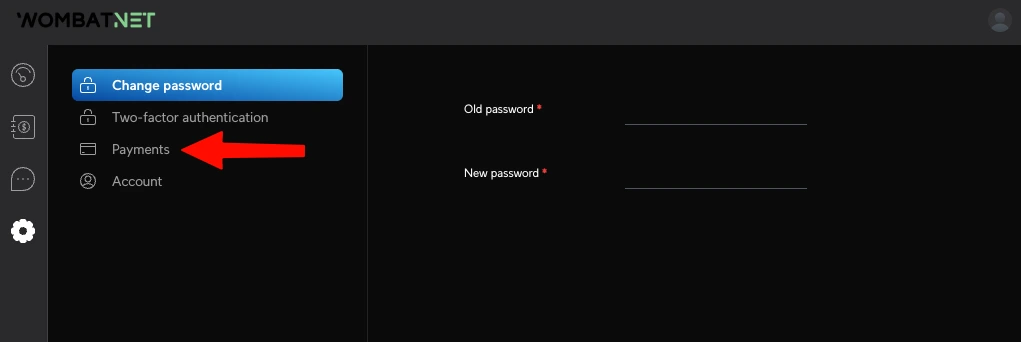
Step 3: Go to Payments In settings, click “Payments” in the menu on the left.
Step 4: Add a credit/debit card Click “Add credit card”.
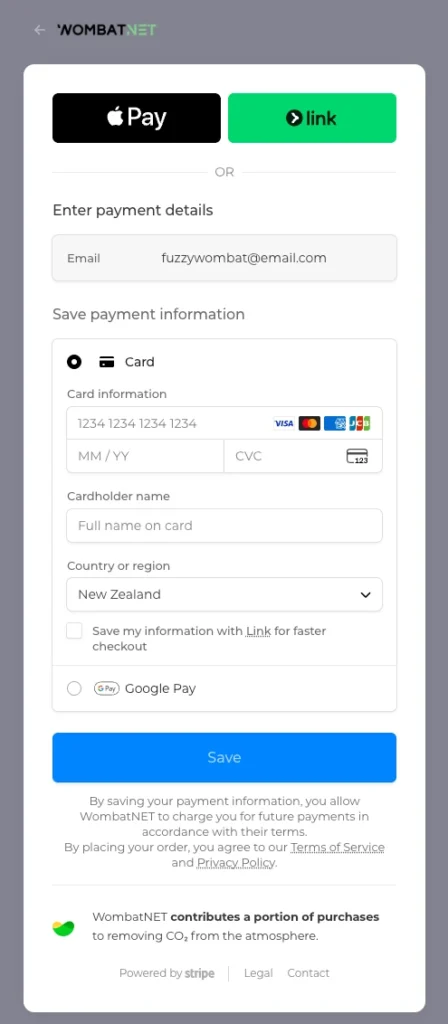
Step 5: Enter your card and save Pop in your card details and hit Save. That is autopay sorted. Your invoices will now be paid automatically each month, so you have one less thing to worry about. If you would rather use Apple Pay, Google Pay or Link, those options are there too.
Good to know Once your card is saved, you can set a maximum monthly charge to cap how much is taken automatically. You can also enable or disable saved cards whenever you like.
Autopay is not the only option. You can set up a self-initiated automatic payment from your bank or pay each invoice manually using the “Pay Invoice” button at the bottom of the invoice. Whatever suits you.
_
Service Information
Not sure who can connect your place? Pick your district on the map to see every broadband provider in your area, fixed wireless, fibre, 4G and satellite, and check your address.
If you live in the rural or semi-rural parts of the Wellington region, the first question is usually the same: what can I actually get out here? The honest answer is that it depends entirely on where your property sits. Upper Hutt has different options from Porirua. A place near Martinborough is different again to one in Waikanae. Coverage gets decided street by street, and sometimes property by property.
So we built a tool to make that easier to work out. It lists every provider we know of in each district, ours and everyone else’s, so you can see the full picture in one place. It covers the whole region, Kāpiti Coast, Porirua, Wellington City, Upper Hutt, Lower Hutt, Masterton, Carterton and South Wairarapa. Pick your district on the map, and you will see who serves it, whether that is via fixed wireless, fibre, 4G, or satellite, with a link to check your own address with each provider.
GW Broadband Map
7
Kāpiti Coast
8
Porirua
6
Upper Hutt
6
Lower Hutt
7
Wellington City
6
Masterton
7
Carterton
7
South Wairarapa
Tap a district to see who can connect you there. The number is how many providers we list.
Pick a district, on the map or below, to see who can connect you there.
Kāpiti Coast 7 Porirua 8 Wellington City 7 Upper Hutt 6 Lower Hutt 6 Masterton District 6 Carterton District 7 South Wairarapa District 7
← All districts All
Kāpiti Coast Localities: Ōtaki, Te Horo, Waikanae, Paraparaumu, Raumati, Paekākāriki
Te Horo, Hautere, Ōtaki, Waikanae
Kāpiti and Horowhenua wireless on its own network. Covers the places fibre misses around Te Horo, Hautere, Ōtaki and Waikanae.
Fixed wireless
Paekākāriki Hill area only
Manawatū based WISP with a small southern footprint reaching the Paekākāriki Hill area.
Fixed wireless
Fibre and managed 4G/5G. No fixed wireless on the Kāpiti Coast.
Local outfit. Fixed wireless in Upper Hutt, fibre across the region, and managed 4G+/5G west of the Remutakas.
Consumer fibre across the region runs on the Chorus network, sold through any retailer.
4G / 5G fixed wireless (One NZ, Spark, 2degrees)
Mobile network broadband off the nearest tower, including rural towers from the Rural Connectivity Group. Coverage depends on the cell site, not your house.
4G / mobile
Low earth orbit satellite. Works almost anywhere with a clear view of the sky. Pricier each month and a foreign operator, but a real option where nothing on the ground reaches.
New Zealand owned satellite on the Kacific network. Slower than Starlink, but a local option run from here rather than overseas.
Porirua Localities: Pukerua Bay, Plimmerton, Whitby, Titahi Bay, Pāuatahanui, Judgeford
Judgeford and Pāuatahanui
An electrical firm that also runs rural AirFibre wireless around the Judgeford and Pāuatahanui hills.
Fixed wireless
Paekākāriki Hill area only
Manawatū based WISP with a small southern footprint reaching the Paekākāriki Hill area.
Fixed wireless
Fibre and managed 4G/5G.
Local outfit. Fixed wireless in Upper Hutt, fibre across the region, and managed 4G+/5G west of the Remutakas.
Separate business and enterprise fibre, mainly around the Wellington CBD and business parks. Vital runs the old CityLink network in the city, and FX Networks (Vocus) carries inter-city and metro fibre. Uncontended and priced for business, not homes.
Fibre
Consumer fibre across the region runs on the Chorus network, sold through any retailer.
4G / 5G fixed wireless (One NZ, Spark, 2degrees)
Mobile network broadband off the nearest tower, including rural towers from the Rural Connectivity Group. Coverage depends on the cell site, not your house.
4G / mobile
Low earth orbit satellite. Works almost anywhere with a clear view of the sky. Pricier each month and a foreign operator, but a real option where nothing on the ground reaches.
New Zealand owned satellite on the Kacific network. Slower than Starlink, but a local option run from here rather than overseas.
Wellington City Localities: CBD, Tawa, Johnsonville, Karori, Khandallah, Mākara, Ōhāriu
Ōhāriu and Mākara valleys
Community wireless for the Ōhāriu and Mākara valleys, where copper is slow and cell signal is patchy. Unlimited plans.
Fixed wireless
Fibre and managed 4G/5G.
Local outfit. Fixed wireless in Upper Hutt, fibre across the region, and managed 4G+/5G west of the Remutakas.
Separate business and enterprise fibre, mainly around the Wellington CBD and business parks. Vital runs the old CityLink network in the city, and FX Networks (Vocus) carries inter-city and metro fibre. Uncontended and priced for business, not homes.
Fibre
Consumer fibre across the region runs on the Chorus network, sold through any retailer.
4G / 5G fixed wireless (One NZ, Spark, 2degrees)
Mobile network broadband off the nearest tower, including rural towers from the Rural Connectivity Group. Coverage depends on the cell site, not your house.
4G / mobile
Low earth orbit satellite. Works almost anywhere with a clear view of the sky. Pricier each month and a foreign operator, but a real option where nothing on the ground reaches.
New Zealand owned satellite on the Kacific network. Slower than Starlink, but a local option run from here rather than overseas.
Upper Hutt Localities: Upper Hutt, Mangaroa, Whitemans Valley, Akatarawa, Te Mārua, Kaitoke
Fixed wireless, fibre and managed 4G+. This is home turf.
Local outfit. Fixed wireless in Upper Hutt, fibre across the region, and managed 4G+/5G west of the Remutakas.
Separate business and enterprise fibre, mainly around the Wellington CBD and business parks. Vital runs the old CityLink network in the city, and FX Networks (Vocus) carries inter-city and metro fibre. Uncontended and priced for business, not homes.
Fibre
Consumer fibre across the region runs on the Chorus network, sold through any retailer.
4G / 5G fixed wireless (One NZ, Spark, 2degrees)
Mobile network broadband off the nearest tower, including rural towers from the Rural Connectivity Group. Coverage depends on the cell site, not your house.
4G / mobile
Low earth orbit satellite. Works almost anywhere with a clear view of the sky. Pricier each month and a foreign operator, but a real option where nothing on the ground reaches.
New Zealand owned satellite on the Kacific network. Slower than Starlink, but a local option run from here rather than overseas.
Lower Hutt Localities: Lower Hutt, Wainuiomata, Eastbourne, Stokes Valley, Petone, Belmont
Fibre and managed 4G/5G. Fixed wireless is Upper Hutt only.
Local outfit. Fixed wireless in Upper Hutt, fibre across the region, and managed 4G+/5G west of the Remutakas.
Separate business and enterprise fibre, mainly around the Wellington CBD and business parks. Vital runs the old CityLink network in the city, and FX Networks (Vocus) carries inter-city and metro fibre. Uncontended and priced for business, not homes.
Fibre
Consumer fibre across the region runs on the Chorus network, sold through any retailer.
4G / 5G fixed wireless (One NZ, Spark, 2degrees)
Mobile network broadband off the nearest tower, including rural towers from the Rural Connectivity Group. Coverage depends on the cell site, not your house.
4G / mobile
Low earth orbit satellite. Works almost anywhere with a clear view of the sky. Pricier each month and a foreign operator, but a real option where nothing on the ground reaches.
New Zealand owned satellite on the Kacific network. Slower than Starlink, but a local option run from here rather than overseas.
Masterton District Localities: Masterton, Riversdale, Castlepoint, Tinui, Mauriceville
Masterton based rural WISP. Builds radio masts for hard to reach Wairarapa properties. An RBI2 partner with Crown Infrastructure Partners.
Fixed wireless
Fibre only. No wireless or 4G east of the Remutakas.
Local outfit. Fixed wireless in Upper Hutt, fibre across the region, and managed 4G+/5G west of the Remutakas.
Consumer fibre across the region runs on the Chorus network, sold through any retailer.
4G / 5G fixed wireless (One NZ, Spark, 2degrees)
Mobile network broadband off the nearest tower, including rural towers from the Rural Connectivity Group. Coverage depends on the cell site, not your house.
4G / mobile
Low earth orbit satellite. Works almost anywhere with a clear view of the sky. Pricier each month and a foreign operator, but a real option where nothing on the ground reaches.
New Zealand owned satellite on the Kacific network. Slower than Starlink, but a local option run from here rather than overseas.
Carterton District Localities: Carterton, Gladstone, Waingawa
Masterton based rural WISP. Builds radio masts for hard to reach Wairarapa properties. An RBI2 partner with Crown Infrastructure Partners.
Fixed wireless
Wider Wairarapa reach
Local Wairarapa wireless, run together by Martinborough Internet and Teletronics. Out to rural spots like Longbush and Tora, with wider Wairarapa reach.
Fixed wireless Fibre
Fibre only east of the Remutakas.
Local outfit. Fixed wireless in Upper Hutt, fibre across the region, and managed 4G+/5G west of the Remutakas.
Consumer fibre across the region runs on the Chorus network, sold through any retailer.
4G / 5G fixed wireless (One NZ, Spark, 2degrees)
Mobile network broadband off the nearest tower, including rural towers from the Rural Connectivity Group. Coverage depends on the cell site, not your house.
4G / mobile
Low earth orbit satellite. Works almost anywhere with a clear view of the sky. Pricier each month and a foreign operator, but a real option where nothing on the ground reaches.
New Zealand owned satellite on the Kacific network. Slower than Starlink, but a local option run from here rather than overseas.
South Wairarapa District Localities: Featherston, Greytown, Martinborough, Lake Ferry
Martinborough, Longbush, Tora
Local Wairarapa wireless, run together by Martinborough Internet and Teletronics. Out to rural spots like Longbush and Tora, with wider Wairarapa reach.
Fixed wireless Fibre
Masterton based rural WISP. Builds radio masts for hard to reach Wairarapa properties. An RBI2 partner with Crown Infrastructure Partners.
Fixed wireless
Fibre only east of the Remutakas.
Local outfit. Fixed wireless in Upper Hutt, fibre across the region, and managed 4G+/5G west of the Remutakas.
Consumer fibre across the region runs on the Chorus network, sold through any retailer.
4G / 5G fixed wireless (One NZ, Spark, 2degrees)
Mobile network broadband off the nearest tower, including rural towers from the Rural Connectivity Group. Coverage depends on the cell site, not your house.
4G / mobile
Low earth orbit satellite. Works almost anywhere with a clear view of the sky. Pricier each month and a foreign operator, but a real option where nothing on the ground reaches.
New Zealand owned satellite on the Kacific network. Slower than Starlink, but a local option run from here rather than overseas.
This map is indicative only. Please contact the provider to confirm coverage at your address.
Coverage here is indicative. Fixed wireless depends on a clear line of sight to one of our sites, and fibre comes down to your exact address, so confirm with the provider before you commit to anything.
There is also a national broadband map –
Internet NZ runs
broadbandmap.nz , which works down to the street address level across the whole country, so it is worth a look. This map is the other way round, just our region, but it names everyone who can connect you, including the ones the national map does not list yet.
Where do we fit? WombatNET runs fixed wireless in Upper Hutt, fibre across the region, and managed 4G+ and 5G west of the Remutakas. We are one option among several, and we would rather you consider all your options up front. If you want a hand reading the map or working out what suits you, get in touch , and we can guide you through it .
Troubleshooting
Welcome to the WombatNET Help Centre — your go-to resource for guides, troubleshooting tips, and everything you need to get the most out of your WombatNET service. What You'll Find…
Welcome to the WombatNET Help Centre — your go-to resource for guides, troubleshooting tips, and everything you need to get the most out of your WombatNET service.
What You’ll Find Here
We’ve put this Help Centre together to make it easy to find answers without having to pick up the phone. Whether you’re setting up your equipment for the first time, investigating a slow connection, or just want to understand your plan better, you’ll find step-by-step guides and clear explanations here.
Our articles cover:
Troubleshooting – Connection drops, slow speeds, and equipment issuesSetup & Installation – Getting your modem, dish, or ONT up and runningWi-Fi & Home Networks – Extending coverage, fixing dead spots, and router tipsService Information – Plans, pricing, coverage areas, and how our technology worksSecurity & Safety – Protecting your network and staying safe onlineNetwork Status – Planned maintenance, outages, and network updates
This Help Centre is growing. We’re regularly adding new guides and improving existing ones. If you can’t find what you’re looking for, please reach out — your question might become our next article.
Need to Speak to Someone?
We’re a small, local team based in Wellington, and we genuinely enjoy helping. If you can’t find the answer here, don’t hesitate to get in touch directly.
We’d rather you reach out than sit stuck with an issue. You’ll always talk to a real person — no bots, no overseas call centres.
Speed & Performance
If you've had 4G internet for a few years, the antenna on your roof could be the reason your connection isn't performing as well as it should. Here's what you…
If you’ve had 4G internet for a few years, the antenna on your roof could be the reason your connection isn’t performing as well as it should. Here’s what you need to know – and what you can do about it.
A Common Setup That’s Now Outdated
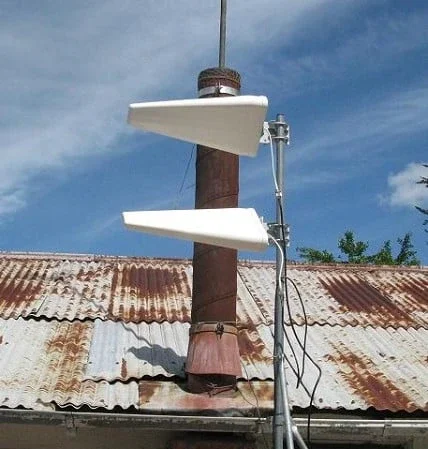
Across rural and semi-rural New Zealand, thousands of homes still use a type of antenna called a Yagi – installed during the early days of the Rural Broadband Initiative (RBI) between 2011 and 2020. These were designed to improve 4G signal in areas with patchy coverage, and they did their job at the time.
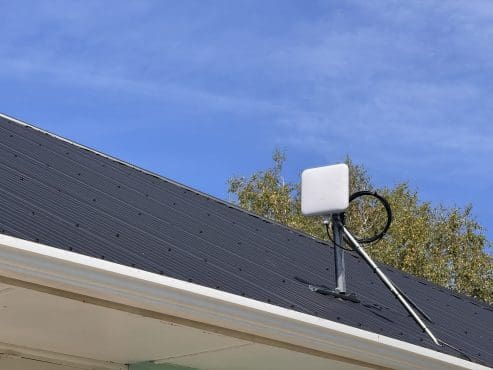
Yagi antennas look like long white triangles or rectangles mounted high on a pole or on the roof. While they technically still work, most people don’t realise these older antennas can actually limit your internet speed – especially with today’s newer mobile network technologies.
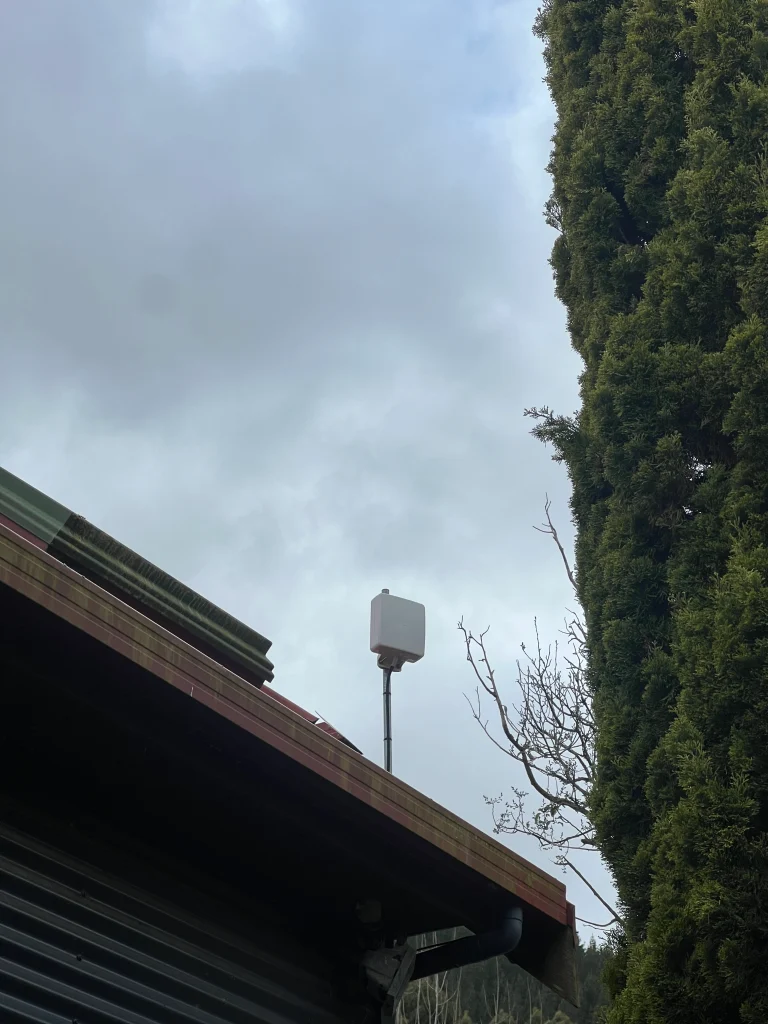
Still using a Yagi antenna? If your antenna looks like a long, thin bar or arrow shape on your roof, it’s likely a single-polarity Yagi – and it could be limiting your speeds. Read on to find out why.
Why Signal Strength Isn’t the Whole Story
Many people assume more signal bars = faster internet. That’s mostly true – but it’s only part of the picture.
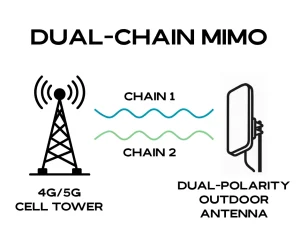
Modern 4G and 5G networks use a technique called MIMO (Multiple Input, Multiple Output) to increase data throughput. Think of it like opening extra lanes on a motorway – more lanes mean more room for traffic to flow. But to use those extra lanes, your antenna needs to support them.
Most older single-polarity Yagi antennas, like the one pictured above, support only one data stream, even if the network could offer two or more. That means your modem is limited to just one lane – and can’t take full advantage of the speeds your provider (or tower) could deliver.
What Is “Polarisation” and Why Does It Matter?
Every radio signal is transmitted in a particular orientation – usually vertical or horizontal. If your antenna is only designed to receive one of those (as many older Yagis are), your modem can pick up only half of what’s being broadcast.
Today’s dual-polarity antennas are designed to receive signals from both orientations (polarities) simultaneously, unlocking their full MIMO capability. This can mean:
Higher download and upload speeds
Better performance in poor signal areas
Improved stability during peak times
Switching to a correctly polarised antenna can unlock 20-100% more speed – without changing your plan. We’ve seen customers’ speeds increase substantially overnight simply by upgrading the antenna and modem setup.
Can’t You Just Add Another Antenna?
Technically, yes – and some people do. You can stack a second antenna at a 45-degree angle to achieve “dual-polarity.” But it’s not ideal. It’s fiddly and prone to misalignment, and you end up with more cables, more bulk, and often worse performance than a single purpose-built antenna.
Today’s better solution is a compact, dual-polarity antenna that does the job properly – tidier setup, less visual intrusion, and better performance.
But the Antenna Is Only One Part of the Puzzle
Sometimes the antenna on its own isn’t the issue – it’s the cabling.
Many setups run long coaxial cables to transfer the signal down from the roof to the 4G modem inside the house. Data travels through the cable as a radio-frequency (RF) signal, and the longer the run, the more signal you lose along the way. This is called cable signal loss or ‘leaking’. This loss accumulates, especially if the cable is older or of poorer quality, or was installed without high-quality connectors, shielding, or proper weatherproofing.
That’s why we often recommend:
Outdoor modem/antenna units: The SIM card is inserted directly into the unit outside, with zero coaxial loss.Ethernet or fibre run inside: Faster, cleaner, and more reliable.Directional tuning: We use specialised tools and expertise to align the gear with the strongest signal (not necessarily the nearest tower).
Coax vs Ethernet cable length: Coaxial cable is best kept to a minimum (5–15m). Ethernet, on the other hand, can run 100m+ with no signal loss, making it far better suited to rural installs where the antenna needs to be high up or potentially even away from the house.
A Smarter Setup = Smarter Internet
There’s no one-size-fits-all solution. You might be in full line of sight of a tower. You might be in a valley, behind a hill, or surrounded by native bush. Every property is different, and so are the optimal antenna types.
At WombatNET, we don’t sell off-the-shelf kits. We assess each location on its own merits, often using custom equipment, tools, and mounts to get the best results. Whether it’s 4G, 4G+, or 5G (where available), our goal is simple: to get you the best possible performance for what you pay.
You Might Be Paying for Speed You’re Not Getting
The frustrating part? You may be on a plan that should deliver decent speeds, but your antenna or cabling is getting in the way.
We’ve seen customers paying $119–$179 per month for 4G service and only getting 5–10 Mbps. With the right antenna and setup, that can jump to 20, 50, or even 100+ Mbps in some areas.
“We switched from our old setup to a new antenna and modem from WombatNET and went from 12 Mbps to 70 Mbps overnight.” – Customer in Kaitoke, Upper Hutt
We Can Help (Even If You’re Not in Our Coverage Area)
WombatNET specialises in rural and semi-rural broadband across the Wellington region – including Upper Hutt, Kāpiti, Whiteman’s Valley, Ōtaki, Wainuiomata Coast, Takapu Valley, and more.
If you’re unsure whether your current setup is holding you back, or if you want some advice, we’re happy to help. Even if you’re outside our installation area, we can usually point you in the right direction or suggest a better antenna type for your needs.
✅ Unlimited 4G+ broadband from $99/month
✅ No coax loss setups
✅ Installed by locals who understand rural
👉 Learn more about WombatWireless ™ 4G+
📷 Contact us here or send us a photo of your current antenna setup via email . We’ll let you know if it’s time for an upgrade – no pressure, no jargon.
Service Information
If you live rurally in Wellington, choosing the right WombatNET internet connection can feel like comparing apples to oranges - especially when both are wireless. So what's the real difference…
If you live rurally in Wellington, choosing the right WombatNET internet connection can feel like comparing apples to oranges – especially when both are wireless. So what’s the real difference between WombatWireless™ X and our 4G+ service? Let’s break it down so you can confidently choose the service that best suits your property, lifestyle, and devices.
Not sure which is right for you? Our team can run a free desktop assessment to check tower coverage and signal strength at your exact address. Contact us now to find the right fit.
What Is WombatWireless™ X?
WombatWireless™ X is our custom-built fixed wireless broadband service. It uses dedicated towers we’ve installed around the Hutt Valley and rural Wellington to beam internet directly to your property through a dish or receiver.
This isn’t cellular or Starlink – it’s a professionally installed, long-range, point-to-multipoint system with a managed network behind it.
Best for: homes and businesses with a clear line of sight to our towers.
What Is WombatWireless™ 4G+?
WombatWireless™ 4G+ is a managed rural broadband service powered by the One New Zealand mobile network , enhanced with professional-grade hardware, signal optimisation, and local support.
Unlike your typical mobile broadband service – where your provider merely ships you a box without guidance and hopes for the best – we test your signal first, recommend the best hardware for your location, and install it for peak performance .
We offer indoor router setups and outdoor integrated modems that combine a 4G+ modem and directional antenna into a single weatherproof unit. This eliminates the need for long coaxial cables and induced cable loss, gives us more flexibility on placement, and significantly boosts real-world speeds – especially in the more signal-challenged areas.
What does the “+” in 4G+ mean?
4G+ refers to LTE Advanced , a faster, more efficient version of standard 4G. It can combine multiple frequencies, or ‘lanes’ (via a function called carrier aggregation), to deliver higher speeds, lower latency, and greater stability, especially at peak times – but only if your equipment and signal are properly selected and tuned. That’s why our managed install matters – we take care of everything from end-to-end for you.
Best for: properties without direct line-of-sight to a WombatNET transmitter, remote or off-grid homes, temporary connections, caravans and baches.
Key Differences (That Actually Matter)
1. How the Signal Gets to You
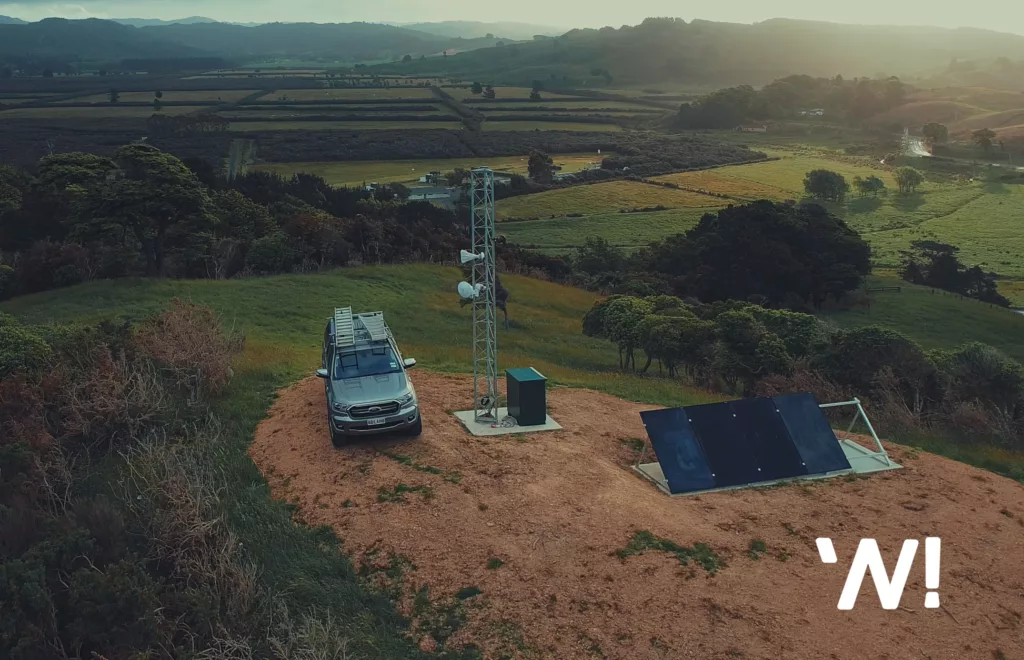
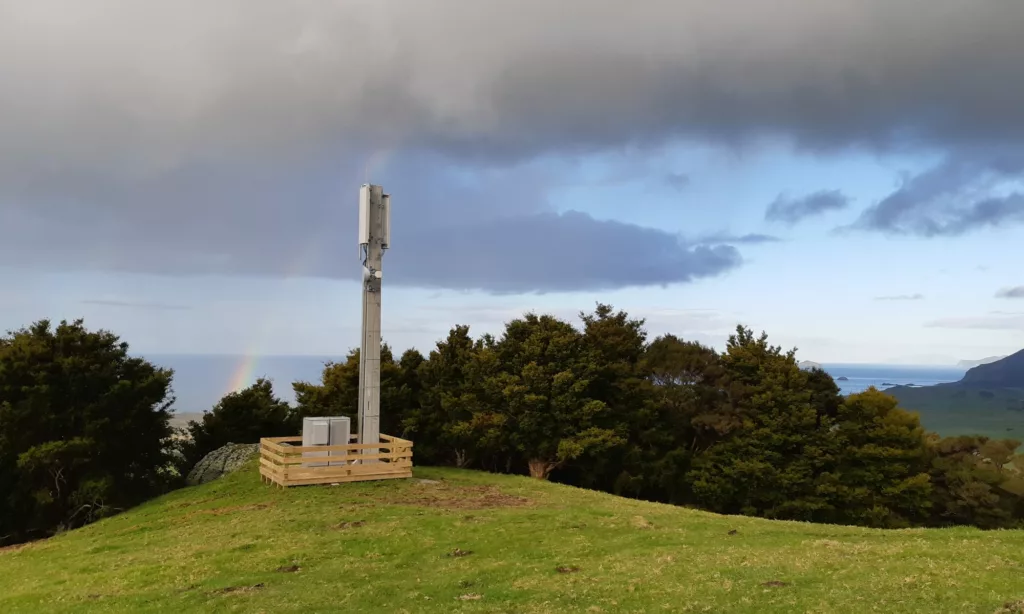
WombatWireless™ X: A fixed wireless signal is transmitted from a WombatNET tower just like the one below, directly to a receiver on your property. It’s a private network that we manage – not public infrastructure.
WombatWireless™ 4G+: Connects via One NZ’s cellular network using licensed mobile spectrum, enhanced with directional antennas and/or outdoor LTE modems, optimised specifically for your site.
What this means: WombatWireless™ X offers remarkably consistent speeds. 4G+ performance can vary with mobile tower congestion, but our complete offering, including tuning, signal mapping, antenna alignment, and LTE Advanced support, pushes performance far beyond typical “off-the-shelf” 4G setups.
2. Speed & Performance
WombatWireless™ X: We fully manage the network from tower to backhaul. Traffic is shaped 24/7 to prevent bottlenecks and ensure steady performance.WombatWireless™ 4G+: We use signal-testing tools to choose the right modem, antenna, and tower. When installed correctly with the right LTE bands, 4G+ can deliver excellent speeds – especially when leveraging LTE Advanced (carrier aggregation).
Tip: If your Netflix buffers only at night, network congestion may be the culprit – not your hardware. This is common with off-the-shelf 4G services. Our managed approach and dedicated support help identify and address these issues quickly.
3. Installation & Equipment
WombatWireless™ X: Requires external dish install with clear line-of-sight to our towers. Once installed, it delivers rock-solid service.WombatWireless™ 4G+: Offers both self-install and managed options, but almost all Wellington-based users opt for the managed install. We may recommend:
A directional antenna with cable run (limited to ~5m due to coax loss):
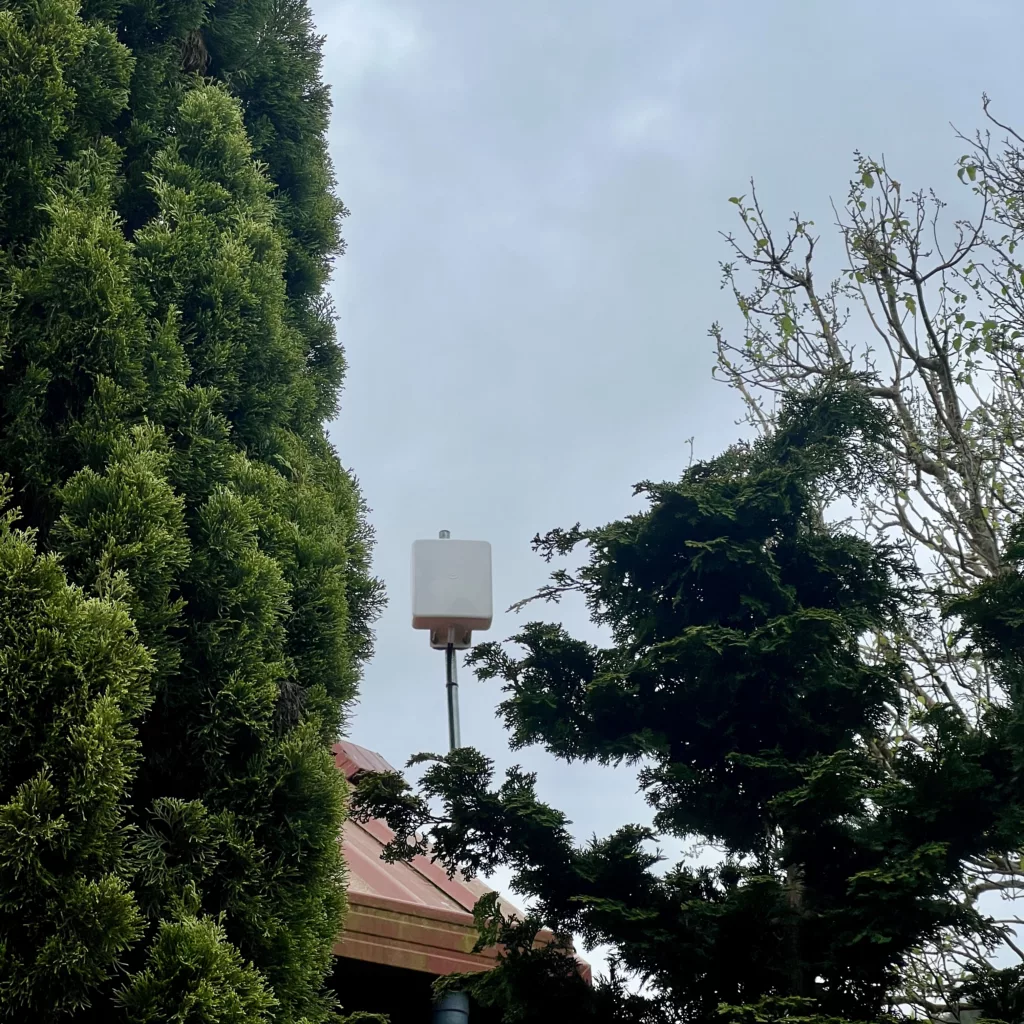
Or, an integrated outdoor modem (4G+ modem and directional antenna in one), connected via Ethernet to an indoor Wi-Fi router, meaning the two can be located further apart for optimal 4G signal:
Why this matters: The integrated outdoor modems eliminate coaxial signal loss, allow longer cable runs (100m+ via Ethernet), and maintain signal integrity – crucial for areas with low-marginal reception.
4. Latency
WombatWireless™ X: Low enough to support cloud gaming, Zoom and VoIP – between 10-40ms, typical WombatWireless™ 4G+: Higher latency and jitter due to the way mobile networks route traffic – still very usable, but less ideal for time-sensitive applications – between roughly 20-150ms
💡 From the founder
We’ve built our network from the ground up – installing our own gear on hilltops, water tanks, and rural land. Our goal isn’t to sell you something that “kind of works.” It’s to deliver a connection that actually fits your life.
Not sure which service fits you best? Our team can run a free desktop assessment to check tower coverage and signal strength at your exact address.
— Your team at WombatNET
Service Information
We know the unexpected sometimes happens. Whether it's a power surge, a dog chewing up your cable, or your modem simply packing up and dying, unexpected equipment issues can leave…
We know the unexpected sometimes happens. Whether it’s a power surge, a dog chewing up your cable, or your modem simply packing up and dying, unexpected equipment issues can leave you without internet access, and we understand how inconvenient that can be. That’s why we’ve introduced our Hardware Insurance Plans , designed to protect your connection and keep you online with minimal hassle.
Who can sign up? Hardware Insurance is available to all up-to-date WombatNET customers. You can add it to your plan at any time by opening a ticket in the client portal or calling us on 0800 424 281
Why Choose WombatNET Hardware Insurance?
Dealing with hardware replacement or repair can be costly and unexpected. With our Hardware Insurance, you’ll have full peace of mind knowing that your Wi-Fi Router/Modem, outdoor wireless broadband receiver, and cabling are all covered – so you can forgo the worry of any out-of-pocket repair bills.
Basic Coverage – $10.75/month
Covers failure through accidental damage, or gradual wear and tear for your Wi-Fi router and external receiving equipment, when outside of your initial contract warranty period.
No-cost replacements for faulty hardware.
Covers accidental cable damage (up to 25m of cable repair per incident).
Available to all WombatWireless™ X and WombatWireless™ 4G+ subscribers.
Premium Coverage – $15.09/month
Includes everything in the Basic Plan , plus:
Priority assistance – faster support when you need it.
No call-out or travel charges for service-related issues.
A FREE Wi-Fi Router upgrade every 3 years to keep up with the latest technology.
Who Should Consider Hardware Insurance?
Customers with onsite hazards (environmental, animal, electrical, physical, etc) who are at higher risk of hardware damage or failure
Those with high-uptime demands, such as critical comms or online businesses, or simply anyone who relies heavily on a stable connection for things like work or study
Anyone who wants to avoid costly out-of-pocket replacements
How Does It Work?
Sign Up – You can add insurance to your existing WombatNET internet plan by opening a ticket through the client portal or calling us on 0800 424 281 Stay Protected – If your equipment is damaged or if you think it might be faulty, contact our support team for a free replacement (based on your plan). If you are a premium customer, we will organise a priority response.Enjoy Hassle-Free Connectivity – Get back online quickly without any stress of unexpected repair bills.
The Fine Print
Please read the following terms carefully before requesting coverage.
Coverage applies only to active WombatNET customers with up-to-date accounts.
Call-out and travel fees are waived for service-related issues under the Premium plan only; user-related faults may still incur charges.
Wi-Fi router upgrades under the Premium Plan are offered once every thirty-six months and include one primary unit. To extend insurance coverage and cyclical upgrades to additional Mesh satellites, coverage at $2.99/m per unit is available upon request.
Cable replacement or repair is covered up to 25m per incident; additional length will incur charges.
Hardware replacements are subject to availability and may be of equivalent or better specifications.
Customers must notify WombatNET within 14 days of an incident to be eligible for coverage.
WombatNET reserves the right to modify or discontinue the offering with 30 days’ notice.
Important: Hardware Insurance does not cover theft, intentional damage, or issues caused by third-party tampering. If you’re unsure whether an incident qualifies, contact us before submitting a claim.
— Your team at WombatNET
Insights & Analysis
6 GHz and AFC in New Zealand: what’s blocking outdoor fixed wireless — The Commerce Commission's latest telecommunications monitoring report has LEO back in the news. Less talked about is a large band of radio spectrum sitting idle while the operators who could…Nine to Noon: rural broadband, Starlink, and the providers at risk — RNZ Nine to Noon on Starlink, rural broadband, and the local providers at risk of closure, with Federated Farmers. Plus context the segment didn't cover.Rural Broadband’s Starlink Dependency: The Missing Context — WombatNET's Alex Stewart expands on his 2nd Jun Herald NOW interview: infrastructure dependency stacking, spectrum constraints on local WISPs, and the TDL funding question.Starlink and Rural Broadband NZ: RNZ Audio and Background — RNZ Midday Rural News on Starlink and rural broadband. Background on the structural risk, the policy context, and what's at stake for rural New Zealand.The Rural Blind Spot | Part 3: In Confidence — Spectrum allocated asymmetrically. Direct-to-Cell consolidation across mobile carriers. A national security gap at GCSB and NZDF. Ministerial advice withheld under s9(2)(f)(iv). Part 3 sets out the structural decisions that closed off the rural market.The Rural Blind Spot | Part 2: They Were Warned — The Commerce Commission's independent expert warned of LEO satellite monopoly risk in October 2025. MBIE internal documents from May 2024 described the same market as a monopoly while the formal OIA response said no analysis existed. Part 2 sets out what was known and when.The Rural Blind Spot | Part 1: Nobody Checked — Between October 2025 and March 2026, 28 OIA requests went to 18 government agencies asking what analysis had been done on rural broadband monopoly risk. Sixteen of twenty-one core questions returned "information does not exist." Part 1 documents the analytical vacuum.Media and brand assets — If you're writing about WombatNET, working on a project with us, or just need a clean copy of our logo, this folder has what you're after. Please use the logos…Alex Stewart: Why Rural Connectivity Faces a Crisis (And What I Told Parliament) — In 2019, I visited a rural community that had been begging for better access to connectivity for years. The big telcos had looked at the area, done the math on…The end of copper? What the Commerce Commission’s decision means for rural New Zealand — The Commerce Commission has recommended deregulating rural copper services, giving Chorus the ability to retire copper lines well before 2030. While copper is old technology, around 70,000 New Zealanders still rely on it as a lifeline, particularly in places with no mobile coverage or reliable power. Our latest blog looks at what this decision means, the risks for vulnerable communities, and why careful planning is essential to ensure no one is left behind.A Warship, Radar, and Why Your Wi-Fi May Have Glitched This Week — How an Australian Warship Interrupted Your Wi-Fi Over the last couple of days, we've been tracking a bit of a mystery on our network. Early Wednesday morning, multiple WombatNET internet…Delivering Trackside Connectivity at Taupō International Motorsport Park — Motorsport events are dynamic, fast-paced, and incredibly exciting - but they can also be notoriously challenging environments for internet connectivity. Due to large event attendance, racetracks often experience slow, overloaded…
For the full interactive experience, please enable JavaScript. Call us on 0800 424 281 or visit wombatnet.co.nz .